Showing posts with label Finacle news. Show all posts

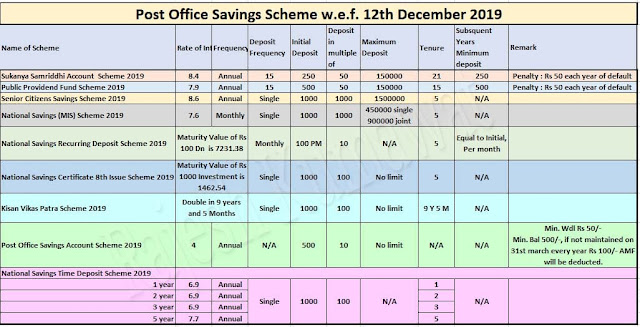
CHANGES AS PER THE GAZETTE NOTIFICATION || DATED 12.12.2019 ||SCHEMEWISE


SSA 

Subsequent deposit multiples of Rs. 50/- . 
FORM 1- ACCT OPENING
FORM 2- FOR PMC
FORM 3- FOR WDL
FORM 4- FOR CLOSURE

PPF

MIN INITIAL DEP FOR OPENING: RS. 500/- MINIMUM PER FY: RS. 500/-. MAX 150000
Subsequent deposit multiples of Rs. 50/- 
Loan Int - 1 % (If the principal loan amt paid in within 36 months) , and 6 % if not paid or partially paid
FORM 1- ACCT OPENING
FORM 2- FOR LOAN AND WDL
FORM 3- FOR CLOSURE
FORM 4- FOR EXTENSION
FORM 5- FOR PMC

SCSS

NO LOCK UP PERIOD. ACCT HOLDER CAN CLOSE THE ACCOUNT AT ANY TIME.
PMC
a) Before 1 year- Already paid interest amount will be recovered.

b) 1 YR - 2 YR- Deduction at 1.5 % of Deposit

c) > 2 YR-Deduction at 1 % of deposit

d) During Extension period, after one YR-NIL.
FORM 1- ACCT OPENING
FORM 2- FOR PMC
FORM 3- FOR CLOSURE
FORM 4- FOR EXTENSION 

MIS

MINIMUM INITIAL DEP FOR OPENING: RS. 1000/- AND MULTIPLES OF RS.1000/-

FORM 1- ACCT OPENING
FORM 2- FOR PMC
FORM 3- FOR CLOSURE

RD

MINIMUM DENOMINATION RS.100/- AND MULTIPLES OF 10/-

FORM 1- ACCT OPENING
FORM 2- FOR PMC
FORM 3- FOR CLOSURE/RENTION OF MATURITY AMT
FORM 4- FOR EXTENSION
FORM 5- FOR LOAN/WDL

NSC

MINIMUM DEPOSIT RS.1000/- AND MULTIPLES OF 100/-
FORM 1- ACCT OPENING
FORM 2- FOR CLOSURE
FORM 3- FOR PLEDGE

KVP

MINIMUM DEPOSIT RS.1000/- AND MULTIPLES OF RS.100/-

FORM 1- ACCT OPENING
FORM 2- FOR CLOSURE
FORM 3- FOR PMC
FORM 4- FOR PLEDGE

SB
MINIMUM DEPOSIT RS.100/- AND MULTIPLES OF RS.10/-
MINIMUM BALANCE TO BE MAINTAIN IS RS.500/-. ACCT HOLDER HAS TO DEPOSIT THE DIFFERENCE AMT WITHIN ONE YEAR.
FEE FOR NOT MAINTAINING MIN BALANCE IS RS.100/- WDL NOT LESS THAN 50/-
NO WDL permitted which has the effect of reducing the balance to less than 500/-
CHEQUE BOOK - FREE FOR 10 LEAVES IN A YEAR. RS.2/- PER SUBSEQUENT CHQUE

FORM 1- ACCT OPENING
FORM 2- WDL AND CLOSURE
TD

MINIMUM DEPOSIT RS.1000/- AND MULTIPLES OF RS.100/-


FORM 1- ACCT OPENING
FORM 2- FOR CLOSURE
FORM 3- FOR EXTENSION
FORM 4- FOR PMC
FORM 5- FOR PLEDGE

Download Gazette Notification ( 179 Pages )

Major Changes in DOP Schemes - Gazette Notification dated 12.12.2019 for Postal Saving Scheme


For opening of new SB Account with minimum deposit of Rs.500/- and RD minimum deposit of Rs.100 & TD deposit minimum Rs.1000

In SB Penalty fee Rs 100 if the minimum of balance of Rs.500/- is maintained in the POSA Account

Old accounts which were opened on or before 12.12.2019 also have to be maintained with Minimum balance Rs.500/

1. Sukanya Samriddhi Account (SSA) can deposit multiple of Rs.50/-

2.Public Provident Fund (PPF) initial deposit must be Rs.500 and subsequent deposit can multiple of Rs.50/-

4. SCSS close at any time. Before one year means interest paid ( already) will be recovery

5. MIS Minimum Deposit Rs.1000/-

6. The minimum amount of monthly deposit in an account shall be one hundred rupees or any sum in multiples of ten rupees.

7. SB Account Initial Deposit Rs.500/- and subsequent deposit multiple of 10/- and minimum withdrawal Rs.50/-.

8. for additional cheque book Rs.2/- per cheque.

9.TD minimum Deposit Rs.1000/- with multiple of Rs.100/-

10. TD Account PMC allowed after 6 month


11. NSC and KVP Minimum Deposit Rs.1000 and multiple of Rs.100/-.

[Download Official Gazette Notification]

Instruction to be followed after CBS-GL integration-reg


The GL Integration with CBS transaction is proposed to be rolled out from 16.10.2019.

The following instructions may be followed until standard DOP received from Directorate.

1. From 16.10.2019, All SOLs should not upload the finacle figures either through ZBF07 of F-02. This is strictly to be followed.

2. From 16.10.2019 finacle transactions will be incorporated with daily account automatically which can be generated only on next day.

3. All counter PAs should login to finacle through POS counter module only, so that POS cash will get tallied on next day.

4. Automatic GL posting in POS cash will happen through GL file which will be created after successful DC (Data Center) closure. Timely EOD by every office will be an important aspect for this. Hence all SOLs should initiate EOD before 1800 Hrs daily without fail. Explanation will be called for from the defaulters.

5. There is new report included in finacle namely, GL daily transaction report- summary which can be used to tally account instead of LOTs.

6. POS cash will get tallied only on the next working day. However SOLs should tally their cash balance without fail on the same day.

7. All SOs are instructed to not to use the BO settlement account (SOLID+339). In BOs, all CBS transaction should be done through DARPAN device only. Transactions not done in devices cannot be accounted as BO transactions. BOs should be strictly instructed in this regard.

8. The cheques which are pending for SB related payments must be paid on or before 15.10.2019 as liability creation for such payments will differ from 16.10.2019 as instructed below.
Debit: Postmaster Cheque account: 420030013
Credit: POSB Onetime Customer: 7000000294
9. Issuing of Cheques remains same through F-58 & ZFF110.

The ATM cash loading/removing procedure will be as follows from 16.10.2019

FunctionFinacle MenuFinacle FunctionDebit account in SAPCredit Account in SAP
Cash LoadingCTMWithdrawalATM Cash Account(SL ID+0006)Teller cash of ATM SOL
Cash Removal CTMDepositATM Cash Account(SL ID+0006)Teller cash of ATM SOL

10. PLI/RPLI transaction uploads/Bills paid uploads can be continued in the existing procedure until further orders.

Doubts in this regard may be clarified with SB order 09/2019 which was communicated through mail.

Procedure to activate DOP Mobile Banking in DOP Finacle


!! Full procedure to activate IndiaPost mobile banking !!

Step 01 : first complete all formalities like mobile banking register and form used for it ( @Post Office SB Counter )

Step 02 : update CIF with Aadhar, PAN, mobile ,email id, mother name, click on yes for internet banking, mobile banking both 

Step 03 : verify CIF modification from supervisor

Step 04 : next day mobile banking for CIF will be activated 

Step 05 : download latest version of mobile banking app of DOP from Google play 

Step 06 : in login screen you will see user id and MPIN screen .leave these fields blank and click on activate 

Step 07 ;: you will see a new screen 

User id : enter your CIF id 
Date of birth : dd-mm-yyyy
Mobile number: your registered mobile number 
CIF id : YOUR CIF id 

Step 08 : click on submit and 4 digit OTP will come to your mobile number .enter that OTP and next then you will be asked to set 4 digit MPIN 

Step 09 : after setting MPIN click on submit 
Now you are ready for login in DOP mobile banking app

Now login 
User id : your CIF id
Mpin : 4 digit code that is set by you


Enjoy DOP mobile banking app


Mobile Application Link below

https://play.google.com/store/apps/details?id=src.com.dop
NON SEEDING OF MOBILE NUMBER - SSA - Report in MIS SERVER

NON SEEDING OF MOBILE NUMBER - SSA - Report in MIS SERVER


Image result for pofinacleguide


This is regarding the report regarding NON SEEDING OF MOBILE NUMBER in SSA accounts. We are getting requests from Circles for generation of this report from backend. Due to non availaility of report generation window we will not be able to generate these reports immediately.  It is hereby intimated that the below report is available in MIS SERVER. This report can be generated SOLWISE and ALSO SCHEMEWISE.


Report of Active CIF not Seeded with Mobile Number or Email
This report cannot be generated CIRCLE SET ID OR HO SET ID as these reports are huge reports.

This report list the details of active CIF which are not seeded with Mobile Number or Email. This report can be generated SOL wise and scheme, Mobile/Email are given as input criteria. The following columns are available in this report:-

(a) Mobile as input criteria
S No
CIF ID
CIF Created Date
Customer Name
E-Mail
Address as per KYC
Date of Birth
Minor if any
Guardian CIF ID, if any


This reports can be accessed by following role users through HFINRPT menu


ROLE_ID
ROLE_DESC
ASP
ASSISTANT SUPERINTENDENT POST
AU
AUDITOR(Inspector)/SBCO/ADMIN
CPC
CPC SUPERVISOR
CPI
CPC INCHARGE
PM
POST MASTER
                                         SU                        Supervisor

This information may please be circulated to POs. Please revert in case of any clarifications.
             
Thanks and Regards
Gopinath S
Inspector Posts
Data Migration Command Centre(CBS)
Chennai 600 002
9962067155
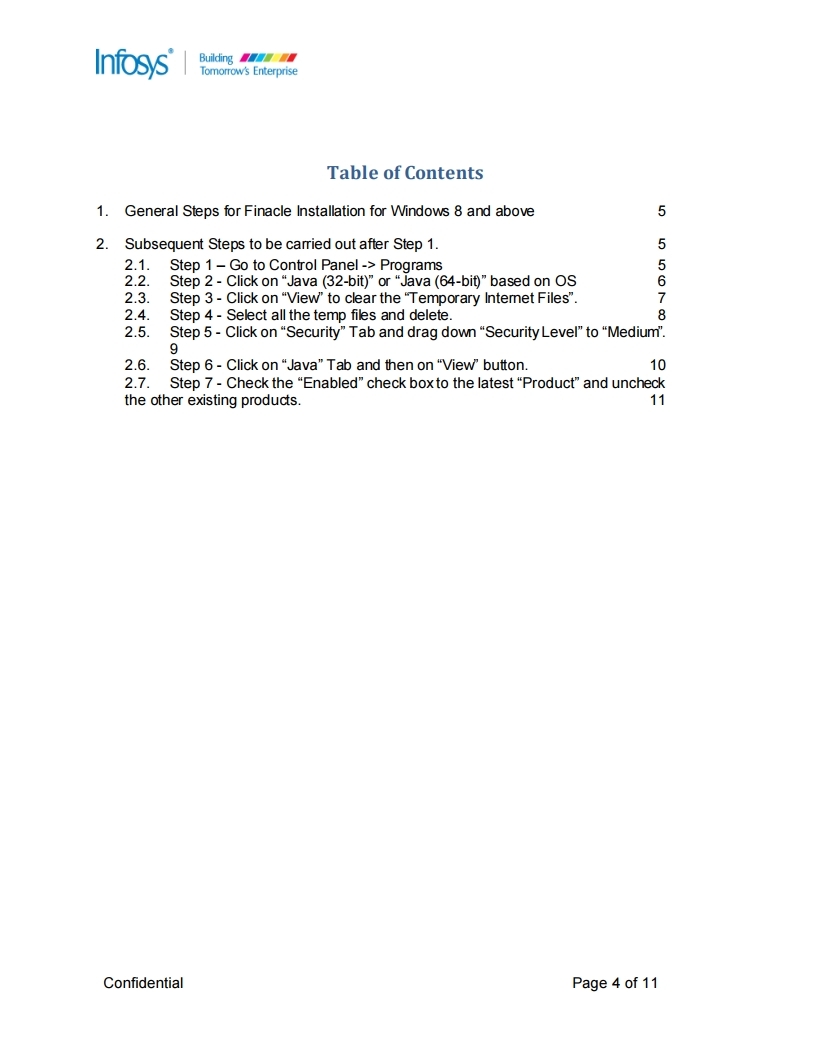
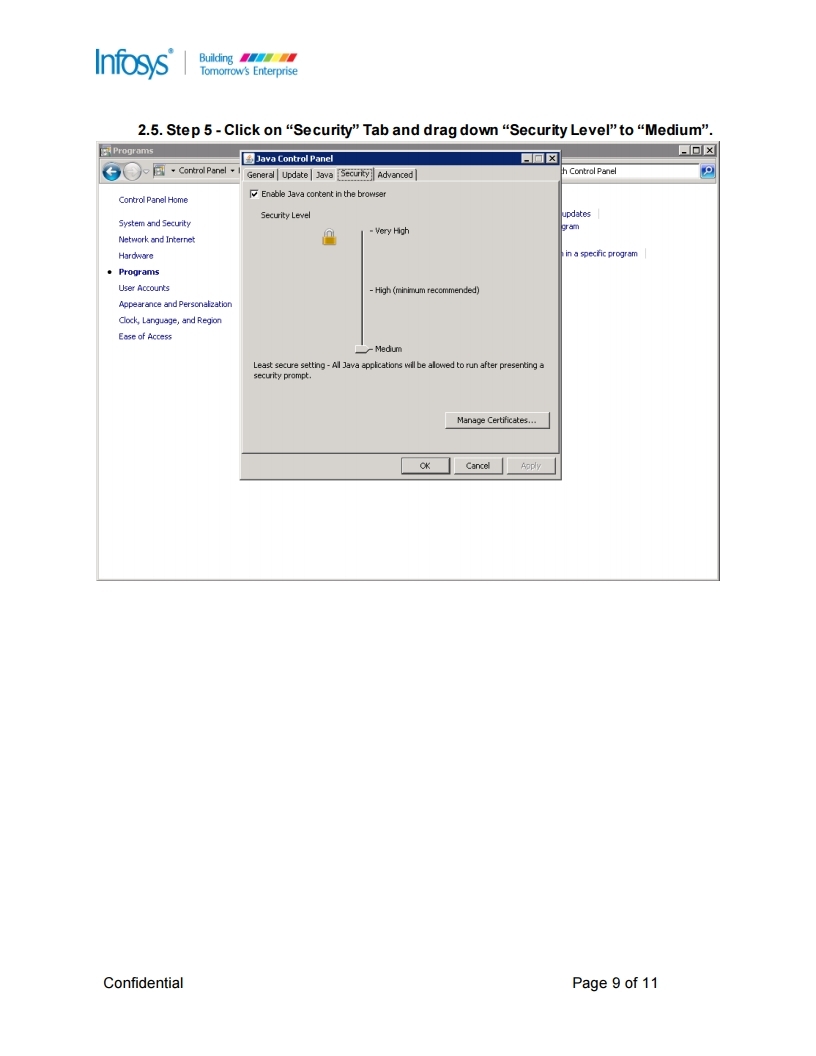
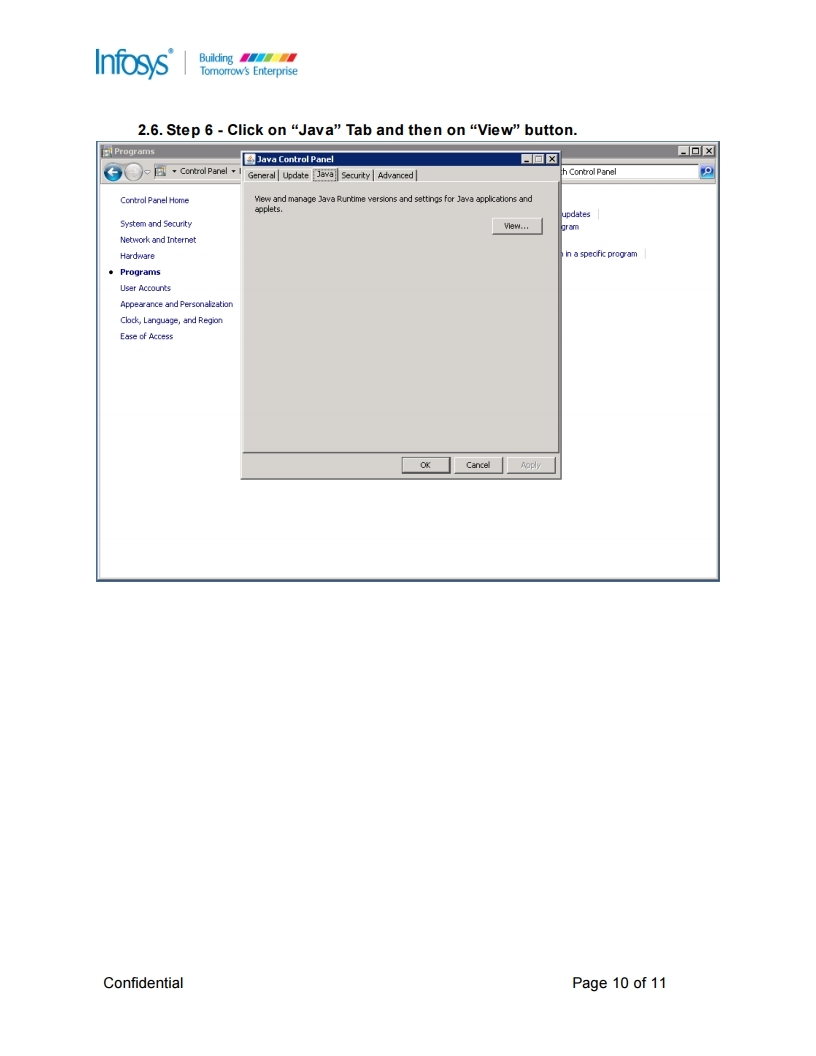
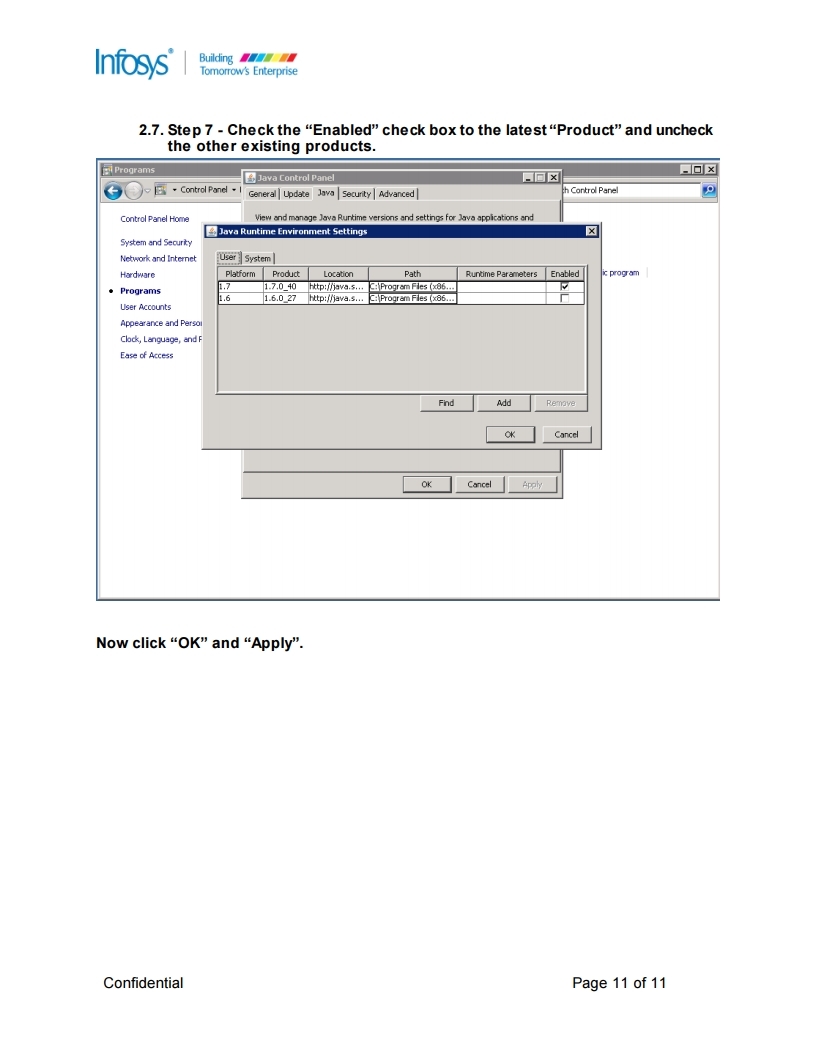
Finacle DESKTOP SETTING FOR WINDOWS 8 and above

Finacle DESKTOP SETTING FOR WINDOWS 8 and above


Image result for pofinacleguide


his is regarding Internet Explorer setting for Finacle for OS Windows 8 & above. We are getting several mails from circles and tickets are also being raised.

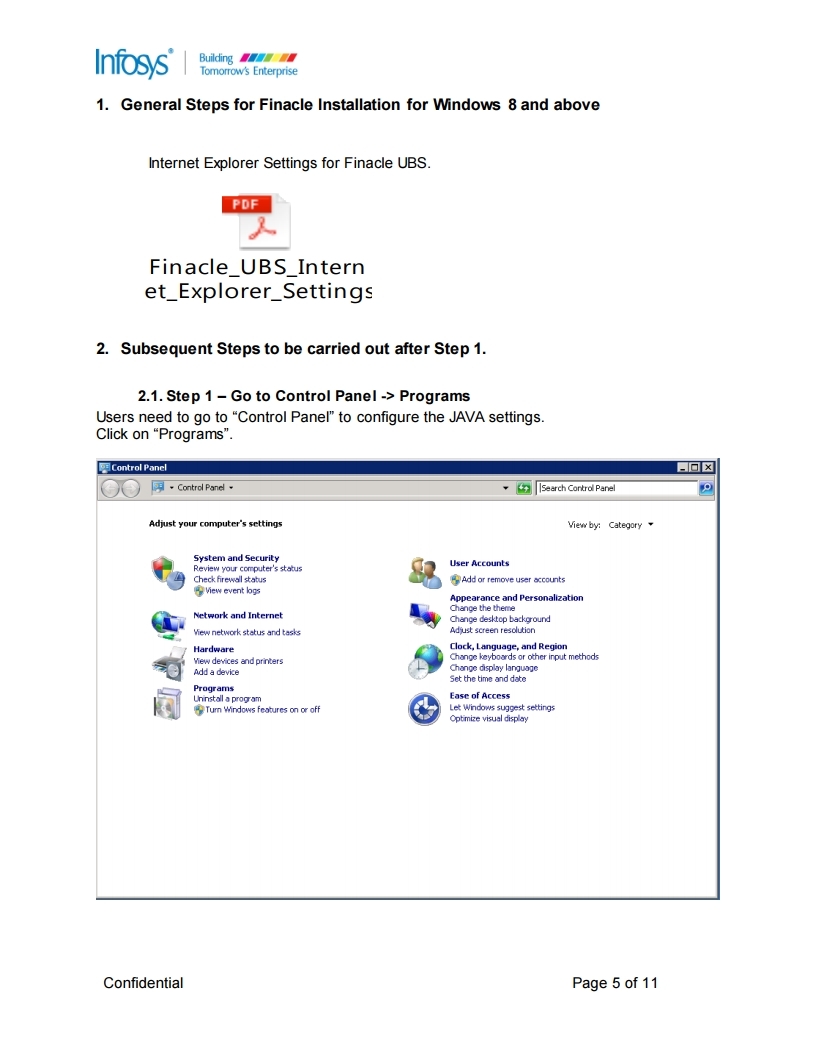
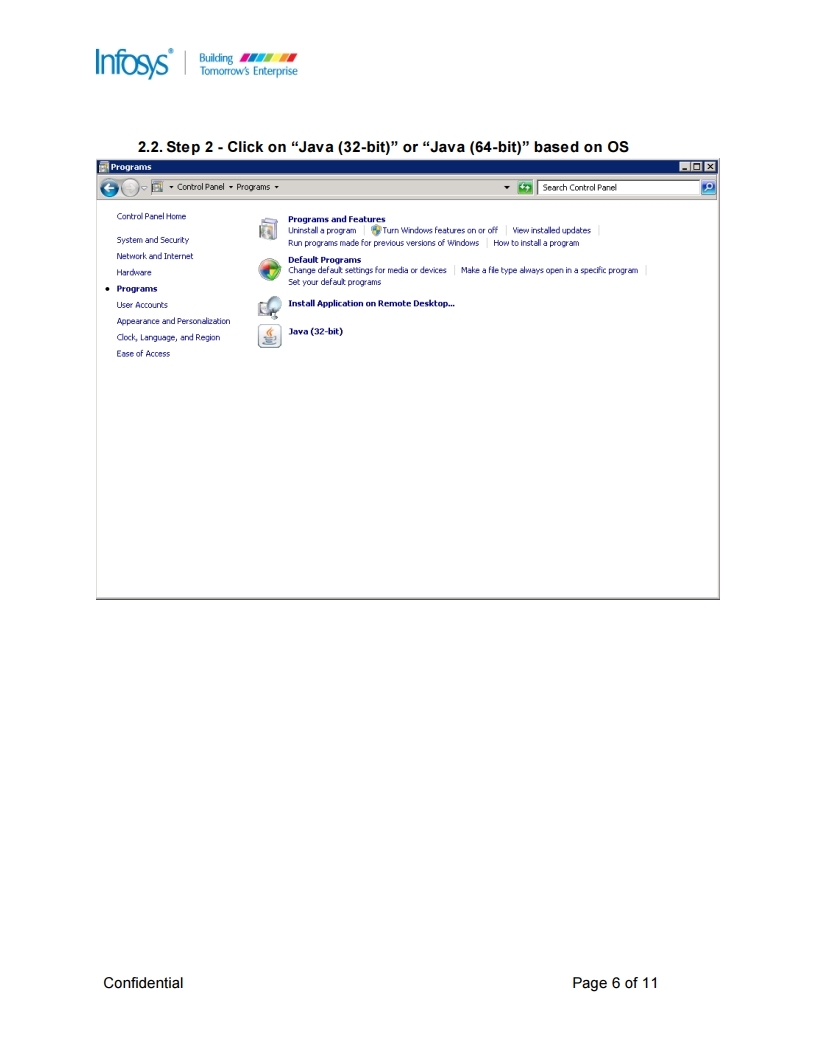
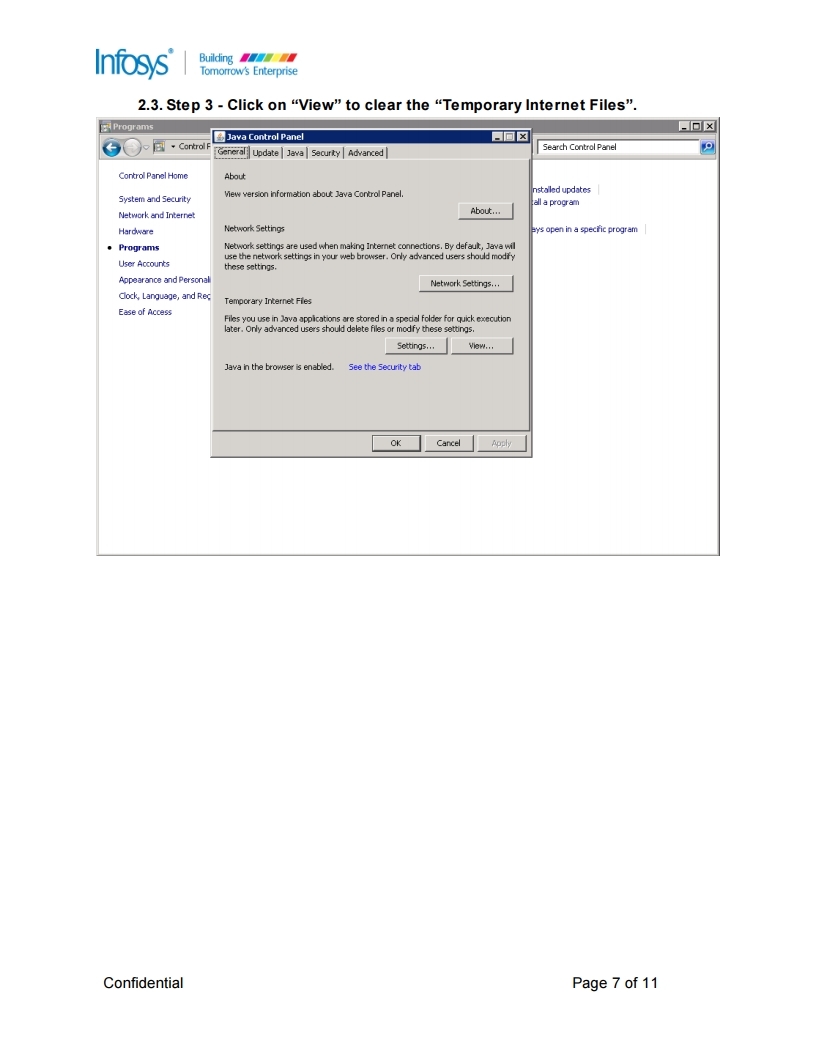
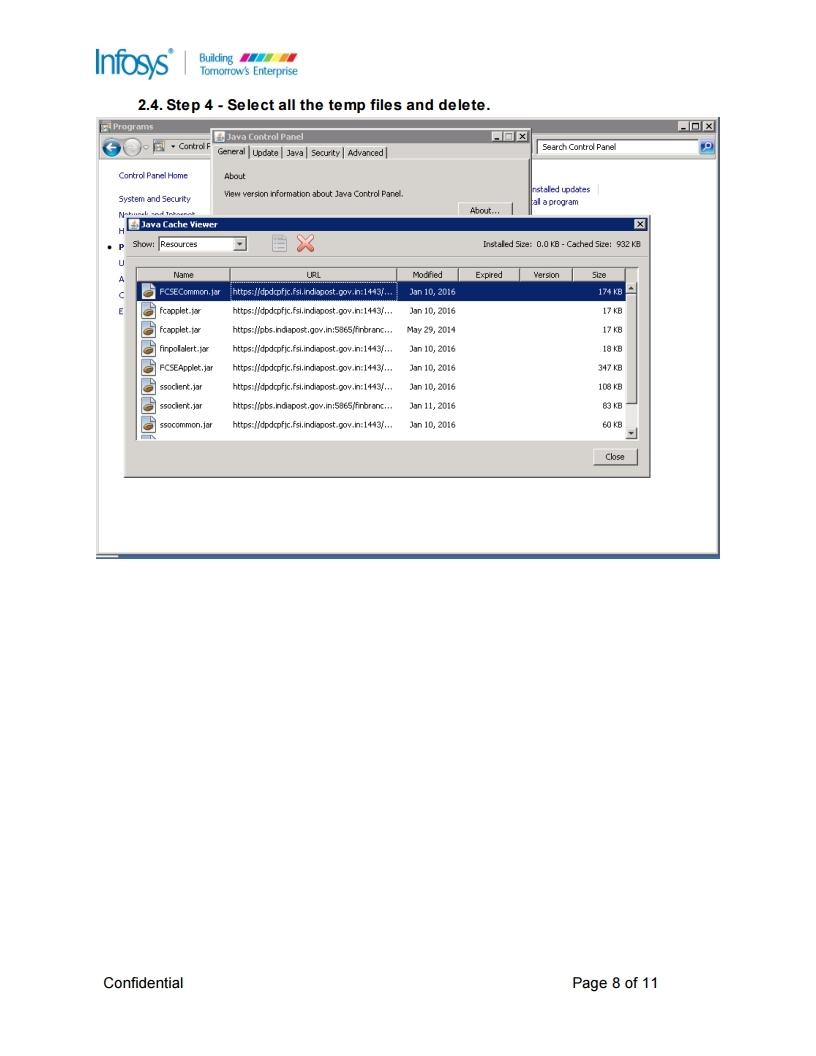
Kindly follow steps in attached documents for Finacle IE settings followed by subsequent steps

1. Please uninstall current Java version ( 32 bit only) and install Java version 7 update 21 provided with Infy Certificate as a part of prerequisite installation. After that you may allow to upgrade to latest version. 

2. After completion of  IE settings add indiapost.gov.in in compatible view settings

For step by step procedure of desktop settings for Windows 8 and above users can CLICK HERE

For step by step procedure of Finacle UBS settings users can CLICK HERE


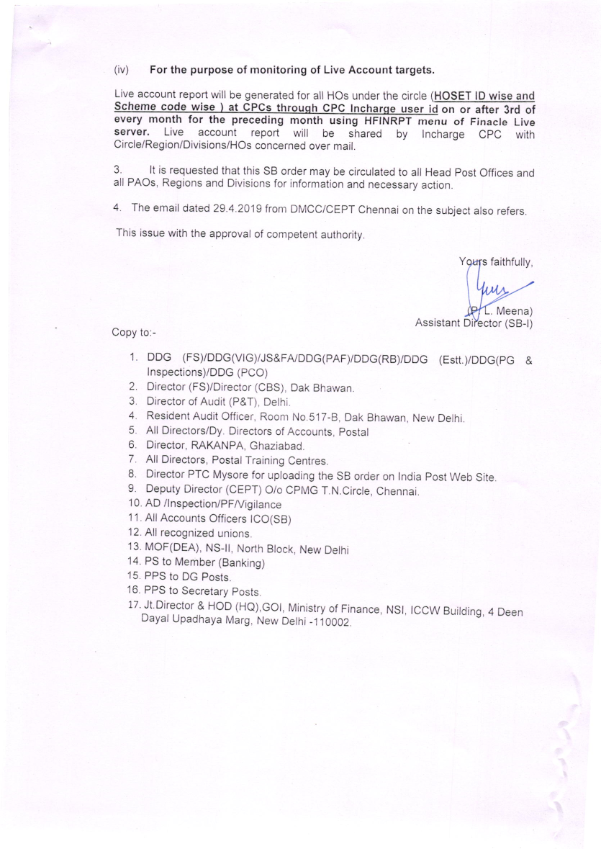
Tallying accounts when HFINRPT is disabled by CEPT

For checking values in HFTI following steps to be done

  1. Go to HFTI
  2. Enter the SOL ID
  3. Enter start date and end date
  4. Give the ledger code for ex. To check SB
  5. give Ledger code as 30001
  6. Uncheck the “Today transaction only” box.
  7. Click on “Go

  • Once it is done the data will be displayed
  • Copy the whole content with the headers and paste it in an excel sheet
  • Go to the small pad like icon and choose “Match Destination Formatting”
  • To tally the amount create one more column after J th column in excel
Select J th column>  Go to Data> Text to column> Delimited tick space and other check box and in other check box give the value as “.” (dot)>Finish
Now you have the values which can be summed according to credit and debit.

  • To calculate the credit first create filter for the 1st row by clicking ctrl+shift+L
  • Then go to K th column then select 00 C for credit transaction and 00 D for debit transaction.
  • Credit and debit transaction are now tallied
Migration of ECS Outward credit to NACH

Migration of ECS Outward credit to NACH

Image result for pofinacleguide


Dear Sir/Madam,

I am directed to convey the following

This is regarding migration of ECS Outward Credit (MIs & SCSS Interest) from RECS (RBI Platform) to NACH.

As per RBI instructions, we need to migrate existing Outward credit from RECS platform to NACH. As part of this activity, ECS Outward credits which were  happening from ECS Nodal offices from the below circles are being centralised at Chennai GPO, being Nodal office for NACH wef 14/12/2018.

Andhra Pradesh
Bihar
Karnataka
Kerala
Madhya Pradesh
Maharashtra
Odisha
Telangana
Tamilnadu
Uttar Pradesh

Patches for updating Chennai GPO as Service SOL has been deployed on 13/12/2018. The POs which were earlier generating ECS txt file need not generate the files from 14/12/2018.

It is also seen from first day's file that several long dated transactions were included in the ECS txt file. We wil be forwarding list of OUTWARD credits entries pertaining to older periods for confirmation from PO on whether these payments were made manually.

Revised process for uploading ECS Credits

1. Chennai GPO has been configured as Service branch for all existing ECS enabled accounts.
2. Circle ECS Nodal centres will not generate ECS outward files from 14/12/2018.
3. Chennai GPO being nodal office will generate single ECS file invoking menu HEGOC  everyday without fail.
4. Chennai GPO will upload these files to NACH platform as per the existing procedure
5.Chennai GPO will account these ECS Outward credits MIS Wdl/ SCSS Wdl in their HO Summary .
6. Circle Nodal offices / HOs will not account these ECS Outward credits.
7. Rejections if any due to Invalid account number will be uploaded thru RECS till such time new account numbers are updated  against old account number.
8. NACH Rejections if any due to ACCOUNT CLOSURE at other bank end, will be communicated by Ch GPO to respective Circle / POs.
9. Concerned SOL will effect payment for NACH rejections on the day when customer visits respective PO by Debiting Chennai GPO ECS Suspense account (600001000098) till such time solution is automated.
10. The above instructions may please be communicated to ECS POs immediately .

Please revert immediately in case of any issues on the above

This has approval of competent authority.


Thanks and Regards
Gopinath S
Inspector Posts
Data Migration Command Centre(CBS)
Chennai 600 002
9962067155


ADD THE FACEBOOK WIDGET CODE HERE